
(04) App Development — 02 / 05
Calendar.
Making that first message
easier to send.
GuestAre you free on the 11th?
belogSorry, that day is fully booked…
GuestThen how about the 12th…?
(the exchange we wanted to remove)
(01) One message
A diary opened,
family plans checked —
and finally, one message.
A booking on LINE usually begins with “Are you free on the ◯th?” Before sending it, a guest has opened their diary, checked their work, thought about their family’s plans, and only then typed it.
And if our reply is “that day is full”? They look at their plans again and send another. We realised we had been asking for that again and again.
There are many booking services. But none of them met our way of working — menus that each take a different amount of time, and conversations on LINE that we want to keep. So we built our own.
(02) Try it
Change the menu,
and the ○ marks change.
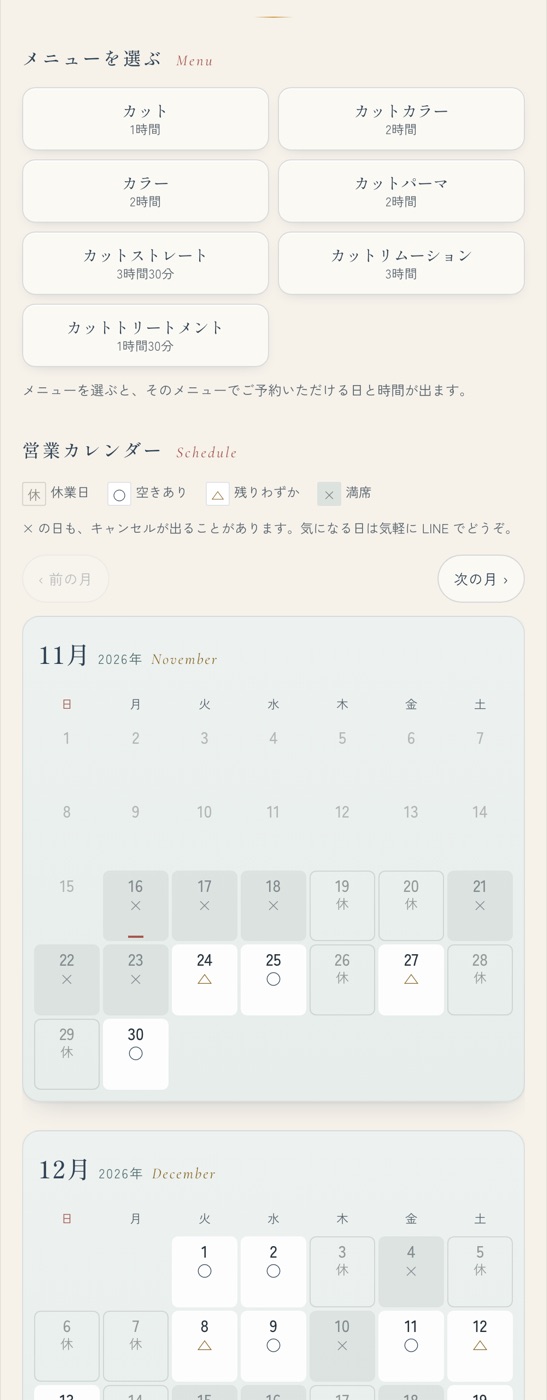
A cut takes an hour, cut and colour two, cut and straightening three and a half. On the same day, a cut can fit while a straightening cannot.
So guests choose the menu first, and only days where that whole menu fits get a ○. A △ means only a few slots remain. Try it here.
Try it (sample schedule)
Choose a menuMenu
○ available△ few left× fullOff closed
Tap a day to see the times that fit.
Open LINE — it is already written
(03) One more question
“Do you have
a second choice?”
Pick a time, and the screen asks right away. It is the line we always say in the salon. With two or three options, one reply is usually enough. So guests don’t have to message us again, we taught the screen that line.
Below it are checkboxes such as “mornings are fine”, “an hour either way is fine” and “it’s my first visit” — the exact words guests often send us on LINE.
(04) For staff
So that every ○
stays true.
If it cannot be updated between clients, a ○ quickly stops being true. So on the staff screen, tapping a date switches it between open and closed.
And a booking is still confirmed after a conversation on LINE, as always. The calendar is a guide; in the end, people confirm it with people.
(05) How it works
Choose, check,
and send.
- 01Seven menus, each with its own time
Cut 1 hour, colour 2 hours, cut and straightening 3.5 hours, and so on. The marks are redrawn for the chosen menu.
- 02○ △ × before you even choose
On opening, days are marked by whether the shortest menu fits. Two or fewer start times means △.
- 03Up to three choices
Each time you pick, it asks for the next. Tapping the same slot twice never adds it twice.
- 04It never quietly changes a choice
If a longer menu is chosen later, slots that no longer fit turn red as “please check” — they are not rewritten silently.
- 05QR code from a PC, six hours of memory
Choices made on a computer pass to a phone. Leave for LINE and come back, and your choices are still there.
- 06Search by conditions
For “I can come at this time”, search by time and menu to see every day you can book.
In the end,
people confirm it with people.